
How to Search for a Collin County Warrant
Use the Sheriff Public Resources page to reach Judicial Online Search. The county warns that all warrants may not be visible. Tyler Case Record Inquiry is a separate way to locate a case, while JP and municipal matters need the court assigned to that citation.
Save the search date and the official result wording. Have a citation or cause number, the issuing court, and the relevant date ready for a clerk. Only enter personal fields on an official court portal, and do not send sensitive identifiers in an ordinary email unless the court directs you to.
- Open Judicial Online Search from the county’s official Sheriff Public Resources page and read its warning.
- Use Tyler Case Record Inquiry to find the likely case; select one case type at a time, then choose Case Records.
- For a city citation, check that municipal court. For a JP ticket, contact the precinct printed on the citation.
- Call the issuing clerk or the relevant constable if the result is unclear. Request sheriff records only when seeking an existing law-enforcement record.
- Texas has no public statewide warrant search. For an out-of-county or federal case, use that jurisdiction’s official court route and get counsel if the search concerns you.
Collin County Warrant Search Starts at Gateway
The sheriff’s Records and Warrants function processes and confirms arrest warrants sent by courts. Its public gateway is useful, but the research found that the live application showed a reload or JavaScript shell rather than stable field labels. Do not assume it accepts a specific name, date of birth, or warrant number unless the current official screen shows that field.
When the app is unavailable, use the county contact page or the issuing clerk. The sheriff’s records page lists (972) 547-5133 and also shows (972) 547-5199 for records help; confirm the current number on the official site. Dispatch at (972) 547-5350 is a public-safety line, not a guaranteed search desk.
A search may be only one part of the process. Tyler’s case inquiry can reveal the court and cause number, and a city court may hold a separate citation warrant.
Collin County Warrant Search Fields
Collin County’s public judicial app did not expose dependable field names in the reviewed screen, so its inputs should not be guessed. Other local systems document different choices. The table separates known labels from fields that still need a live official check.
| Field Label | Type | Required | Notes |
|---|---|---|---|
| County warrant app | Current labels not exposed | Unconfirmed | Do not assume name, DOB, or number fields; county says some warrants may not be viewable. |
| Tyler case type | Selector | One type at a time | Choose Case Records after selecting the type. |
| Wylie citation + DOB | Text and date | Portal-specific | Wylie’s city court portal documents this pair. |
| Wylie license + state | Text and selection | Portal-specific | Use only the current official city form. |
| Wylie plate + state | Text and selection | Portal-specific | Not a countywide search field. |
| Wylie name + DOB | Text and date | Portal-specific | Use the same city portal’s instructions. |
| Wylie business name | Text | Portal-specific | Separate route shown on the municipal form. |
Tyler Separates Collin Case Searches by Type
The county case-information instructions say to select one case type, then open Case Records. The page describes Tyler inquiry as real time and gives a daily 6 p.m. data-update note. That timing applies to case-search information, not necessarily to the separate active-warrant display.
Use this route to identify the court and cause number before calling. Historical coverage differs by court: the District Clerk says older felony matters before 1988 require manual research, while county criminal and JP ranges follow their own limits. A case result can remain after a warrant changes status, so ask the clerk directly about recall or service.
The county’s case-information page sets out the Tyler portal path and its update note.
The underlying case inquiry helps identify the issuing court; it does not independently confirm the latest warrant status.
What a Collin County Warrant Search Returns
Portal fields vary, and Collin’s live public search labels were not exposed in the inspected text. A redacted schema is still useful: read the court and number first, then confirm the process type and current status with that court. No real name or warrant number belongs in a public sample.
| Case / citation | Number shown on the official notice |
|---|---|
| Charge / offense | The court’s case label; read it with the cause type and docket. |
| Issuing court | The local court that controls settings and recall. |
| Bond | A setting that must be confirmed with the clerk or magistrate. |
| Status | Local wording such as active, served, or recalled; meanings can differ by system. |
Collin County Warrant Requests Target Existing Files
A question about current judicial status belongs with the issuing court. A public-information request is for an existing record held by an office, such as an arrest report, dispatch log, or sheriff warrant-processing entry. The Sheriff Open Records page accepts online or written Chapter 552 requests and explains the court-record boundary.
State the record type, date or date range, location, and report or cause number if known. The county does not have to create an all-warrants spreadsheet or provide legal research. The image below shows the sheriff’s request instructions and routing notice.
Read the sheriff’s warrant-record request steps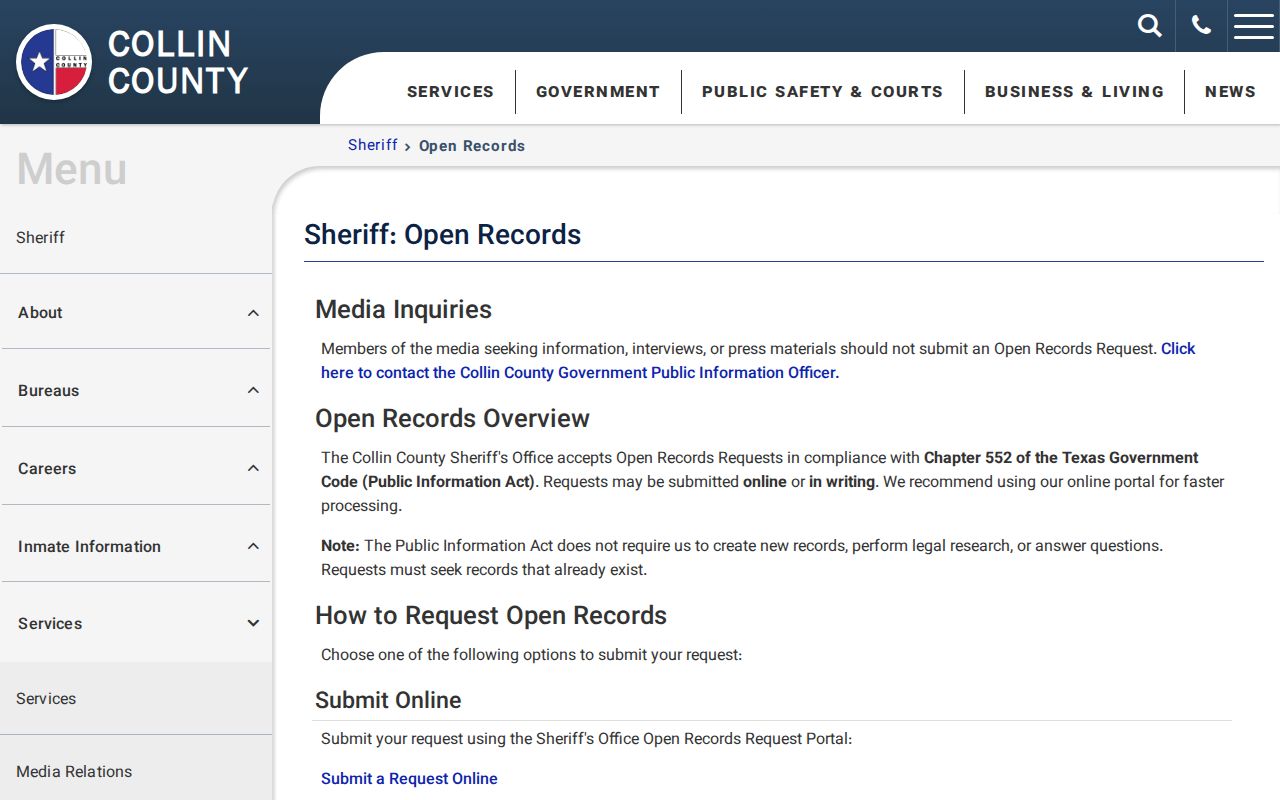
If the record is a docket or judgment, send the request to the District Clerk, County Clerk, JP, or municipal court that keeps it.
The Sheriff publishes separate civil and records fee information. Check that list for a report type and current charge before sending payment; a listed record fee is not a general fee for every warrant search.
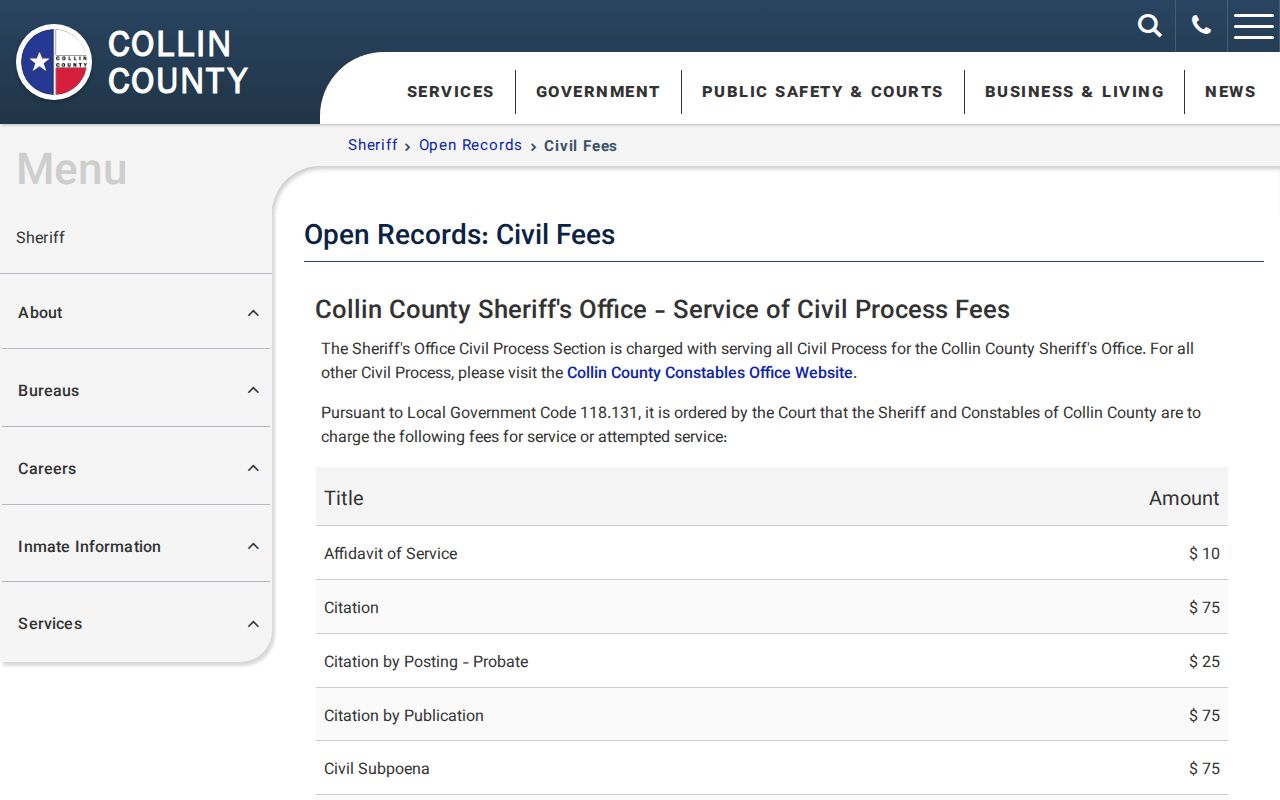
Ask which fee applies to the document requested and whether the record is held by the Sheriff or by a court clerk.
Where Collin County Warrants Are Checked
District felonies go to the District Clerk and issuing district court; County Court at Law misdemeanors go to the County Clerk’s criminal clerks. JP traffic and Class C cases belong to the assigned precinct. Municipal citations stay with the city court. The sheriff can confirm processing or execution records but does not replace those courts.
The county’s general open-records page says court records must be routed to the appropriate clerk. For JP3 process, the Constable Precinct 3 Warrant Division lists (972) 881-3069 for clearing and (972) 881-3070 for a county-system check. Other constables have separate territories and contacts.
Collin County City Warrant Lookup Is Separate
Municipal systems vary. Wylie exposes citation and identity routes but warns that not all violations are online. Frisco offers e-court navigation; McKinney links warrant and payment options; Allen’s current vendor endpoint was not confirmed; Plano’s official warrant page behaved like a JavaScript shell. A county search cannot be assumed to cover any of those local dockets.
If the city portal is unavailable, call the municipal clerk and ask for the current lookup route. Do not use a guessed vendor URL. For a JP case, read the precinct from the citation and allow three to five business days for a new ticket to enter the case search.
Collin County Warrant Requests Go to the Record Custodian
If a public result is missing, decide whether you need a live case-status answer or an existing document. The Sheriff’s Open Records process accepts requests for law-enforcement records, but its staff do not create a search result or provide court files held by the District Clerk, County Clerk, JP, or city court. A sheriff request should identify the record type, date range, and any report or case number that will help staff locate it.
The county states that an office generally responds within ten business days. Use the Sheriff’s official Open Records instructions for submission details, then contact the proper clerk for a court docket.
The Sheriff’s separate public-request portal shows the online entry route for a records submission.
Follow the prompts for a law-enforcement record; use the District Clerk, County Clerk, JP, or municipal clerk for a court document.
Access and Restricted Warrants
Public display does not mean every underlying document is open. A sealed record, juvenile matter, protected identifier, or law-enforcement record covered by an exception may not appear or may be redacted. Texas has no general public statewide warrant-search site; the DPS FTA/FTP program concerns court-reported license holds, not a statewide warrant list.
Key Rules:
Texas Government Code Chapter 552 provides access to existing public information, with exceptions and confidentiality protections.
Section 552.108 can protect law-enforcement information in the circumstances defined by law.
Collin County warns that not every warrant is publicly viewable; a blank result does not confirm that none exists.